

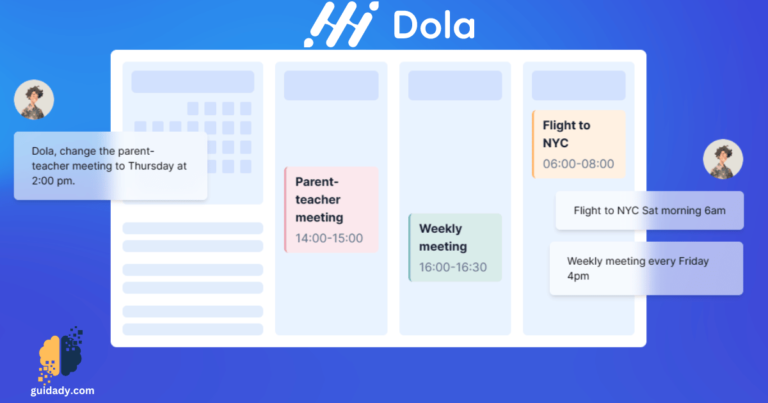
[vc_row][vc_column][vc_headings linewidth=”0″ borderwidth=”1″ borderclr=”#000000″ title=”Doula AI” google_fonts=”font_family:Comfortaa%3A300%2Cregular%2C700|font_style:700%20bold%20regular%3A700%3Anormal” titlesize=”60″ titleclr=”#000000″ caption_url=”” caption_urls=”” caption_urlss=”” caption_urldesc=””]Doula AI Calendar Chat: Your Personal Assistant for Productivity[/vc_headings][vc_single_image image=”5531″ img_size=”full” alignment=”center”][vc_column_text]Do you want to chat with your calendar? Meet Dola AI, the smart assistant that helps you plan your events with ease. Dola AI works on your favorite messaging apps, like WhatsApp, iMessage, WeChat, and more. Just connect your Google Calendar account and start talking to Dola AI. You can ask Dola AI to create, edit, delete, and find events using natural language. Dola AI will also keep you updated on your schedule on both your messaging app and Google Calendar.[/vc_column_text][vc_btn title=”Visit Website” color=”warning” align=”center” i_align=”right” i_icon_fontawesome=”fas fa-external-link-alt” add_icon=”true” link=”url:https%3A%2F%2Fhidola.ai%2Fen|target:_blank”][vc_separator color=”peacoc”][/vc_column][/vc_row][vc_row][vc_column][vc_headings style=”theme4″ borderclr=”#000000″ style2=”image” title=”Features” google_fonts=”font_family:Comfortaa%3A300%2Cregular%2C700|font_style:700%20bold%20regular%3A700%3Anormal” lineheight=”3″ titlesize=”40″ titleclr=”#000000″ image_id=”2871″][/vc_headings][evc_icon_with_text type=”icon-left” icon_library=”fontawesome” title_tag=”” icon_fontawesome=”fas fa-brain” title=”Natural Language friendly” text=”Dola is a smart AI assistant that can handle your calendar events with natural language.” text_color=”#0a0000″][evc_icon_with_text type=”icon-left” icon_library=”fontawesome” title_tag=”” icon_fontawesome=”fas fa-gem” title=”Friendly” text=”You can add, edit, cancel, or check your events with simple commands or queries.” text_color=”#0a0000″][evc_icon_with_text type=”icon-left” icon_library=”fontawesome” title_tag=”” icon_fontawesome=”fas fa-random” title=”Complex tasks handler” text=”Dola AI can process complex requests, such as adding multiple events at once or reasoning about time.” text_color=”#0a0000″][evc_icon_with_text type=”icon-left” icon_library=”fontawesome” title_tag=”” icon_fontawesome=”fas fa-photo-video” title=”All types of inputs” text=”Dola can also understand voice, images, and text messages, making it easy to communicate with it.” text_color=”#0a0000″][evc_icon_with_text type=”icon-left” icon_library=”fontawesome” title_tag=”” icon_fontawesome=”fas fa-magnet” title=”Smart reminder” text=”Dola AI will send you reminders when you need them and help you stay on track with your schedule.” text_color=”#0a0000″][evc_icon_with_text type=”icon-left” icon_library=”fontawesome” title_tag=”” icon_fontawesome=”fas fa-users” title=”Group Chat” text=”Dola AI can also join your group chats and update the group calendar with any changes from anyone.” text_color=”#0a0000″][vc_separator color=”sandy_brown” border_width=”3″][/vc_column][/vc_row][vc_row][vc_column][vc_separator border_width=”3″][vc_headings style=”theme4″ borderclr=”#000000″ style2=”image” title=”Use Doula AI in Common Apps” google_fonts=”font_family:Comfortaa%3A300%2Cregular%2C700|font_style:700%20bold%20regular%3A700%3Anormal” lineheight=”3″ titlesize=”40″ titleclr=”#000000″ image_id=”2852″ caption_url=”” caption_urls=”” caption_urlss=”” caption_urldesc=””][/vc_headings][/vc_column][/vc_row][vc_row][vc_column width=”1/4″][mvc_infobox link=”link_box” title_color=”#000000″ image_id=”5536″ alt=”Whatsapp” btn_url=”url:whatsapp%3A%2F%2Fsend%2F%3Fautoload%3D1%26app_absent%3D0%26phone%3D19165628142%26text%3DHi%2520Dola%252C%2520let%2527s%2520get%2520started!|title:Whatsapp|target:_blank” caption_url=””][/mvc_infobox][/vc_column][vc_column width=”1/4″][mvc_infobox link=”link_box” title_color=”#000000″ image_id=”5533″ alt=”App Store” btn_url=”url:https%3A%2F%2Fbcrw.apple.com%2Fsms%3Aopen%3Fservice%3DiMessage%26recipient%3Durn%3Abiz%3A945a7c5a-41dc-4255-9eeb-d63c71e2bfdf%26body%3DHi%2520Dola%252C%2520let%2527s%2520get%2520started!|title:Download%20From%20AppleStore|target:_blank” caption_url=””][/mvc_infobox][/vc_column][vc_column width=”1/4″][mvc_infobox link=”link_box” title_color=”#000000″ image_id=”5534″ alt=”Telegram” btn_url=”url:tg%3A%2F%2Fresolve%3Fdomain%3Dhidolabot|title:Telegram|target:_blank” caption_url=””][/mvc_infobox][/vc_column][vc_column width=”1/4″][mvc_infobox link=”link_box” title_color=”#000000″ image_id=”5535″ alt=”Line” btn_url=”url:line%3A%2F%2Fti%2Fp%2F%40594mesrk|title:Line|target:_blank” caption_url=””][/mvc_infobox][/vc_column][/vc_row][vc_row][vc_column][vc_separator border_width=”3″][vc_headings style=”theme4″ borderclr=”#000000″ style2=”image” title=”ScreenShots” google_fonts=”font_family:Comfortaa%3A300%2Cregular%2C700|font_style:700%20bold%20regular%3A700%3Anormal” lineheight=”2″ titlesize=”40″ titleclr=”#000000″ image_id=”2996″][/vc_headings][vc_separator][vc_media_grid element_width=”6″ gap=”30″ item=”masonryMedia_Default” grid_id=”vc_gid:1709452474216-85eb72760c111be008a7e344ea087721-7″ include=”5539,5540″][/vc_column][/vc_row]
0 Comments